 ecbyts
GHG inventory: from consumption to results
About 7 min read
- Guide
- Video
- Tour
Turn measured consumption into emissions: declare each source, register the reading, apply the emission factor and read the result by scope. 22 actions on a complete fictitious inventory, open and free.
Start from the consumption you already measured: kilowatt-hours, litres, tonnes. The hard part is not the arithmetic, it is keeping source, reading, factor and scope tied to the same record and the same year. ecbyts treats the inventory as part of the same environmental model that holds wells, campaigns and documents: each emission source is an element, each gas measurement is an observation, and the tables come from those records.
The GHG inventory from scratch tour walks through seven objectives and 22 actions. Each action needs your click and the matching result before the objective closes. You can pause or leave; the demonstration needs no account and no paid plan.
A complete, open and free dataset
The data owner makes the entire dataset transparent and free for the community. The example contains only three emission sources, one campaign and three readings, without terrain or elements from another study. Its data and factors are fictitious and do not represent a real company.
Download the complete ECBT model key · Check the manifest and integrity · Open the tour with this model
In the Portuguese interface shown in the video, go to Bibliotecas → Biblioteca de Normas → Inventário de GEE do zero — modelo público fictício → Abrir modelo gratuito (Libraries → Standards Library, the marketplace → the fictitious public GHG model → Open free model). The card identifies the data owner, zero price, and that the model opens in its own project tab inside the app. “Novo” (New) introduces the control; the exercise uses a copy of this prepared model.
Five terms before you start
The terms follow the most widely used international reference for corporate inventories.
- Scope 1: direct emissions from sources the organization owns or controls, such as boilers and its own fleet.
- Scope 2: emissions from purchased electricity and heat. “Location-based” uses the average factor of the grid the energy comes from.
- Scope 3: all other indirect emissions in the value chain, such as suppliers, travel and waste.
- Emission factor: how much gas one unit of activity emits, for example kg of CO₂ per kWh.
- tCO₂eq and GWP: each gas is converted into tonnes of CO₂ equivalent by its global warming potential (GWP), so everything adds up in one unit.
Consumption × emission factor
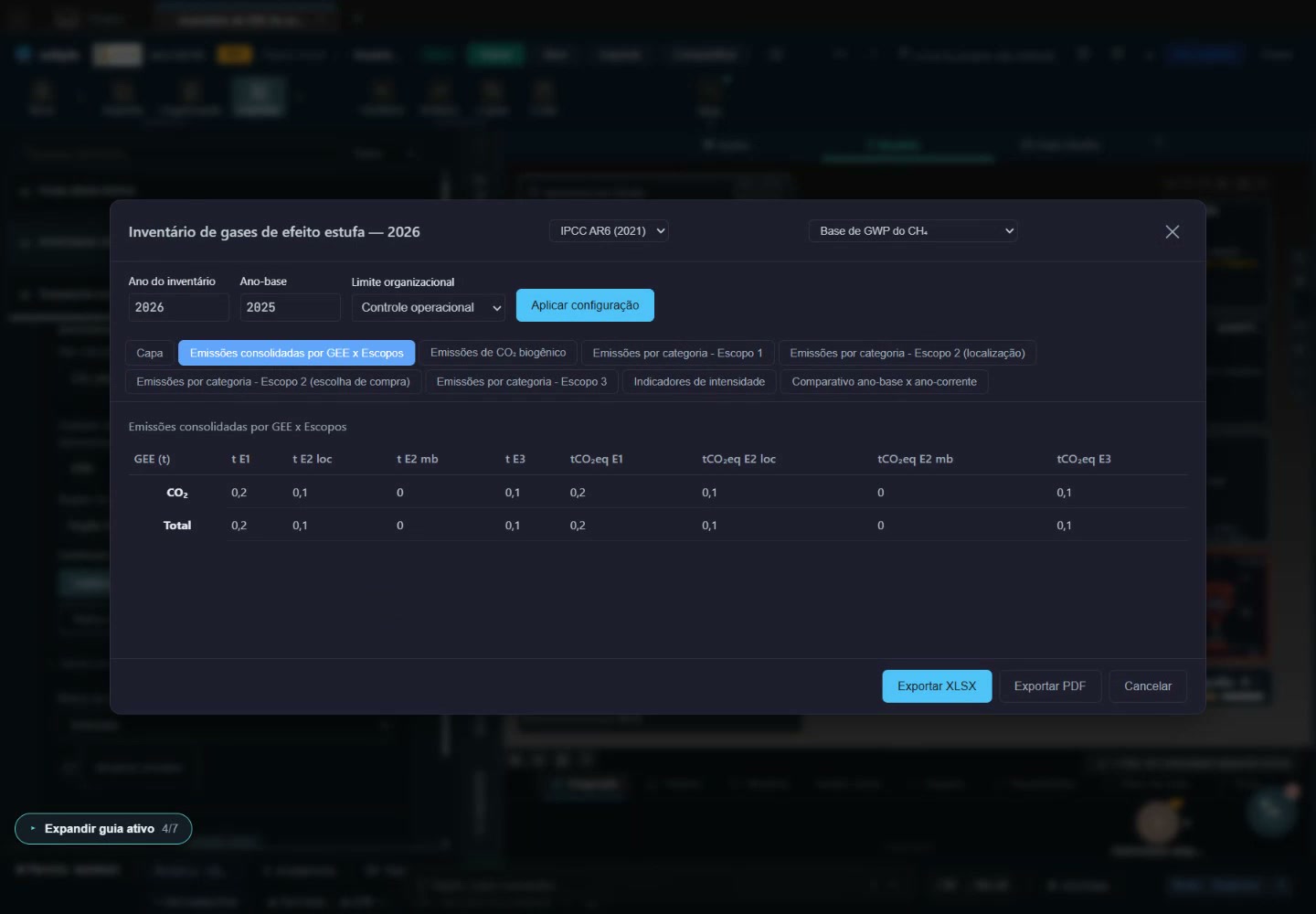
The electricity reading uses 1,000 kWh × 0.1 kg CO₂/kWh = 100 kg CO₂. With a global warming potential (GWP) of 1 for CO₂, this contributes 0.1 tCO₂eq. The three sources total 0.4 tCO₂eq. The tour lets you inspect the original reading, the fictitious factor, its reference and its confirmation in the inventory. In a real inventory, location-based scope 2 uses the official grid average factor for the inventory year; in Brazil, the National Interconnected System (SIN) factor published by MCTI.
The full video below follows the 22 actions using the same dataset. It was captured in the real interface during an anonymous demonstration session, with no login or sign-up, and reaches the end of the tour in just over two and a half minutes. The interface in this V04 recording is in Portuguese; English subtitles describe each objective. It does not show a real company's operations or a verified inventory.
What the tour shows
- Open the example. Find the free copy in the library and open its data in another tab.
- Define the inventory boundaries. Inspect scope, category, period, baseline year and organizational boundary.
- Record an activity. Locate the consumption reading, inspect the fictitious factor and confirm the derivation.
- Check the result. Open the inventory, inspect the tables and GWP reference, and return to the original reading.
- Review outstanding issues. Identify the example's limits and gaps without treating the demonstration as a complete inventory.
- Explore decisions. Inspect budgeted costs, the marginal abatement cost (MAC) curve, the linked project and the carbon-footprint calculator. Costs and abatement are planning inputs; this climate context is not a complete life-cycle assessment (LCA).
- Share and continue. Copy the complete key, consult the self-declaration and plans, return to the inventory and consider whether to associate a learning badge. Profile or badge publication stays optional, and the tour stops before association or public publication happens.
Scope and limits
Seven objectives train the route, they do not close an inventory. Third-party verification stays outside the exercise. The ecbyts seal summarizes the data version and who answered for it; it is not an environmental agency's endorsement. The demo numbers are fictitious and serve to learn where each thing sits.
What it costs
The tour is free and needs no sign-up. With a free account, you can create and import models using your own data, without a subscription. The Pro plan offers advanced features, such as saving models to the cloud, and costs R$ 49 per month or R$ 490 per year, under the terms published in the plan catalog.
Open the GHG inventory tour · See the other tours in the Tour Trail
From a corporate inventory to a product study
The GHG inventory above covers organizational emissions. To study a product or service, open LCA calculators → Life cycle study with your own inventory. The separate editor lets you declare a goal, functional unit, boundary and assumptions; connect processes and suppliers; enter environmental quantities and your own factors; calculate declared impact categories; and save or recover a study file. The initial editor and guided instructions are in Portuguese.
The fictional two-process example requires 2 kWh of own energy for 1 kg of product. Its inventory is 2 × 0.4 + 0.2 = 1 kg CO₂ and 0.014 m³ of water. The water indicator and factors are educational, not a real water-scarcity method. Doubling the functional unit doubles this example. Missing factors remain visible gaps; a subtotal is not a total impact.
No external database is loaded. Climate can use the GWP table already in the app with an explicit version and CH₄ origin. Do not add this study to the corporate inventory: the same emissions may occur in both. Match boundaries, periods, gases, units and GWP versions before comparing climate results. Use Attach study to model, then save the model or export its ECBT key to preserve the study, mappings and historical results together. Reopening checks the source and recalculates; changed data require an explicit refresh. You can also download a separate study JSON; browser saving keeps only a local copy. The editor does not attest ISO conformity or provide independent critical review, statistical uncertainty analysis or proof of a complete LCA.
Twin production as the denominator of product intensity
In the study Inventory, read model observations and map the environmental numerator. Under Link twin production, select positive product mass and declare product, lot, period, boundary and dry or wet basis. Confirm that numerators, inputs and allocation bases share that scope. Original observations remain unchanged.
One process execution represents the whole period/lot. Observed production supplies the process output, and the matrix applies the 1 tonne functional unit once. This reference quantity is never presumed measured production. Without coproducts or other burdens, the fictional oracle 12 t CO₂ / 80 t product = 0.15 t/t becomes 0.10 t/t when only production changes to 120 t. Changed sources invalidate the result and require explicit refresh and recalculation.
Missing, zero or incompatible production cannot be calculated. Existing intensities such as kgHg/kgAu or tCO₂/t product are refused as absolute masses. Rates, concentrations and cumulative counters require explicit preparation; duration, flow, volume and moisture are never assumed. Mass allocation derives the selected product basis from linked production; other coproduct bases remain declared. Inventory mass is distinct from CO₂e characterized with a selected GWP method.
Download the fictional preparation study in Portuguese · Practice the twin-production link
The file contains manual teaching estimates, not measurements. The tour requires your own numerator and production observations; it creates no twin data. Product, lot and boundary are explicit declarations checked for consistency, not physical facts established by a hash. Replace scope, sources and inventory before real use. The initial editor and guided instructions are in Portuguese.