 ecbyts
Updated
From the QR code to the accountable person: the ECBYTS Seal shows who answers for each piece of environmental data
About 14 min read
- Guide
- Video
- Tour
Each data version carries a QR code with the result, the assessment rule behind it and the role of whoever answered for it, plus the share that is still unsigned.
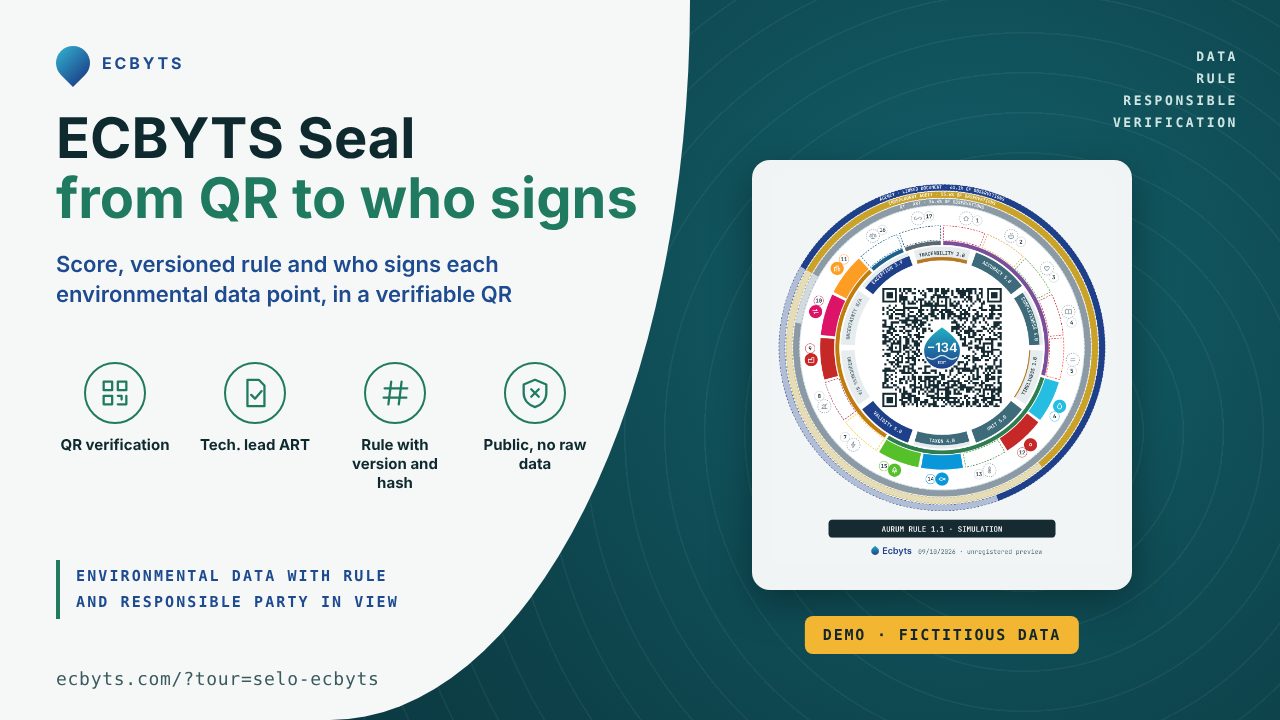
ecbyts is a platform for organizing environmental data in a digital model: sites, elements such as wells, sampling campaigns, results and documents. The seal condenses that model and its responsibility records into a QR code.
When reviewing an environmental study, the result alone leaves questions unanswered: which data were used, who recorded responsibility for them and which version does that involvement cover? The seal organizes this information for consultation, including where coverage remains incomplete.
The ECBYTS Seal brings together the data version, the rule used and the responsibility records, and marks what is still missing. It helps those commissioning, reviewing or using a study separate technically supported measurements, internal estimates and documents from an environmental agency. Before investing or taking on a project, this is where to locate data sources, documents and the scope of each recorded responsibility.
No layer of the seal validates the study or stands for environmental agency approval. To explore it with fictional data before creating an account, open the guided seal preview. The walkthrough helps you locate the percentage denominator, observation coverage and record version.
The video below is a demonstration with fictitious data from an earlier version: useful to recognize the screens, not proof of every effect in the current walkthrough. Use the guided tour link to practice.
Despite its name, the seal is not legal compliance, does not replace the technical report and carries no endorsement from an environmental agency. In this version it is a publisher's self-declaration built on a method still evolving: the numbers support internal reading and discussion between the parties, not comparisons between companies. The record identifies who accepted a role, under which rule and for which data version. Read that role together with the scope of the Brazilian Technical Responsibility Registration (ART) and the documents; the seal alone does not determine legal liability.
What is ecbyts, and who is it for?
Professionals and consultancies use the model to organize studies; the data owner follows the work; technical professionals and auditors record their involvement; clients and reviewers consult the results and responsibility coverage. Public QR access and the guided preview with fictional data require no registration. An account is required to record learning-track progress on the platform, store models in the cloud and take part in issuance.
Start with three questions
- Which result am I reading? Identify the balance, the denominator behind the percentage and the rule version. A percentage without its base does not tell you the size of the result.
- Which observations are covered? Read the technical responsibility, audit and agency-document bands separately. Partial coverage does not cover the entire study.
- Does this record match the current data? Check the version and status through the QR code. A preview or simulation teaches you how to read the seal; an issued record must be interpreted together with the documents and the scope of each role.
How to read the seal
The seal is read from the inside out, in six layers. The figure below uses a demonstration model with fictional data and responsible parties.
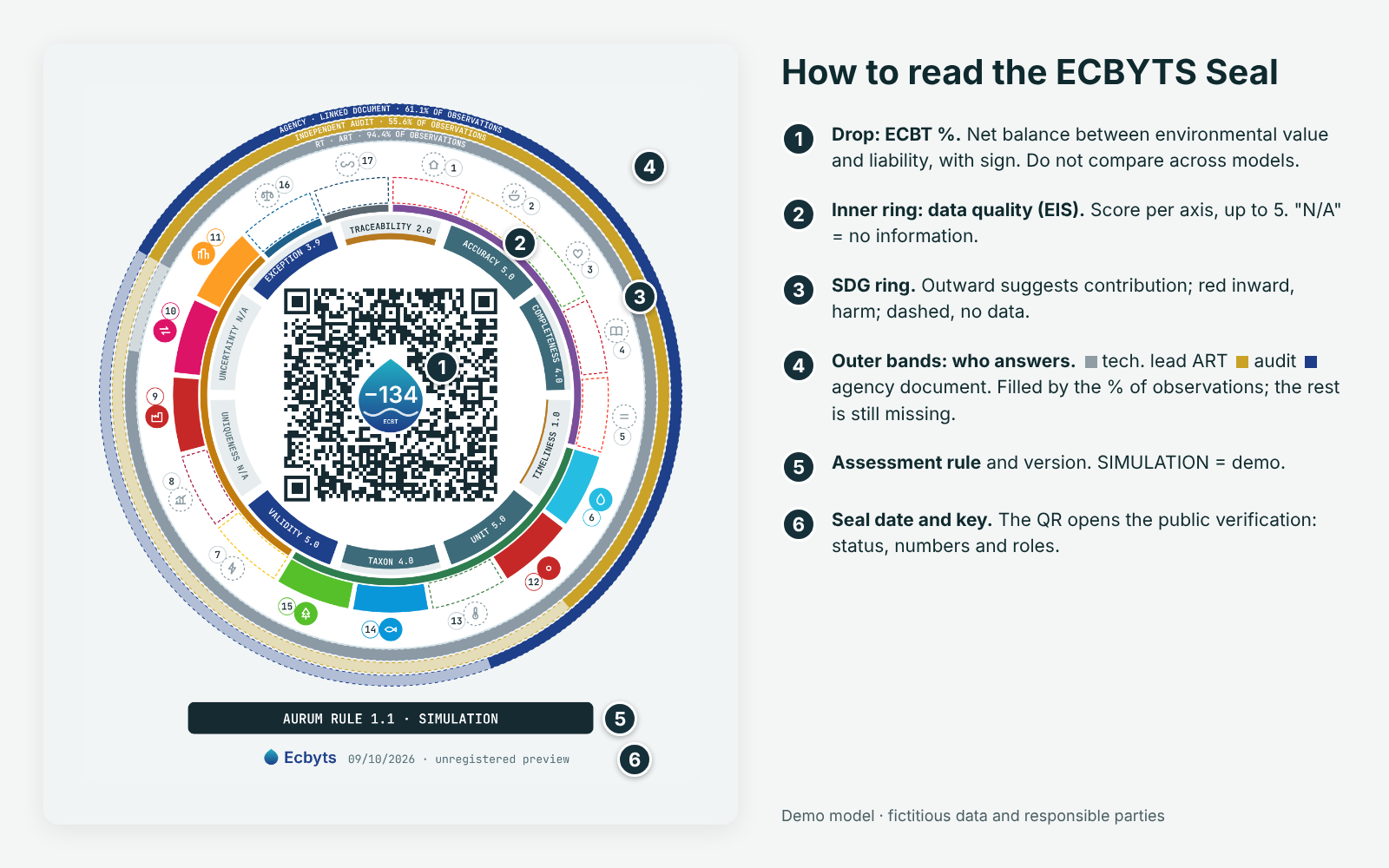
The figure is an earlier demonstration example. In the blue band, “aceite via responsável legal” means an agency document linked by the legally responsible party, without agency approval of the calculation or study.
- Drop, at the center: ECBT %. Shows the monetary balance relative to the model's financial base. The sign indicates a positive or negative balance; without a valid base, it displays n/a.
- First ring: data quality (EIS). Each sector shows an axis, scored from 0 to 5; N/A means insufficient information.
- Second ring: the SDGs. Each sector is one of the 17 Sustainable Development Goals, grouped by the five Ps (people, planet, prosperity, peace and partnership). An outward bar suggests contribution; a red inward bar suggests harm; a dashed bar indicates an SDG with no data; a faded sector indicates an SDG with no link to the model. Bar size represents estimated impact; coverage and confidence are treated separately as evidence quality. This is a model indicator, not a proven contribution.
- Three outer bands: who is responsible. From the center outward: gray represents observations covered by the Technical Responsible party's ART; gold represents those externally audited; blue represents those with an agency document attached by the Legal Responsible party. Each band is filled in proportion to the observations covered, with the percentage written on it. The uncolored part is what still needs signing. Audits and agency documents count only where an ART already exists. In the figure, 66.7% of observations have an ART, 61.1% were audited and 38.9% have an agency document.
- Rule band. Just below the circle are the name and version of the Assessment Rule used (GAIA 1.0 in the figure). For a demonstration model, the band says SIMULATION.
- Footer. Issue date and seal key (ECB-…). Before issuance, the footer says “unregistered preview”.
The QR code, around the drop, opens the public verification page. It repeats the numbers and shows the seal status (valid, provisional, superseded, expired, revoked or invalid), each responsible party's role and the ART check status.
In practice, the seal shows the result and the proportion of observations covered by each responsibility. That coverage is read over the observations, not over the monetary value, and it gives no guarantee that the numbers are correct.
What does “value” mean, and what is divided in the drop?
“Value” here is a calculated monetary result in the model's currency. The central number is realized assets minus estimated liabilities; the breakdown also presents a range calculated under the method's simplified assumptions. Natural capital, when available, appears on a separate line and is not added to the main result. This result is not available cash, a sale price or a credit the user receives.
ECBT % = net monetary balance ÷ financial base saved in the model × 100. The base may be revenue, EBITDA (earnings before interest, taxes, depreciation and amortization) or market value. It must be positive and in the same currency as the balance. Without a valid base, the result is “n/a”: not available, not zero.
For illustration only: a balance of R$20,000 against a base of R$1 million gives +2%. A balance of −R$20,000 against the same base gives −2%. You need to know the base, period and data source before interpreting the percentage. In this version, bases vary between models; the percentage cannot be used to compare them.
A note about the letter F.
F identifies financial intensity mode: the balance is expressed relative to the financial base. It is not a quality grade or an assurance level. An older figure may show this letter; the current card may display the percentage without it. Check its meaning in the ECBT breakdown, together with the base actually used.
What EIS and the SDGs tell you
EIS: data quality
EIS stands for Environmental Integrity Score, the name of the score the application uses to organize data-quality indicators. Each sector is an axis, such as transparency, accuracy, completeness, timeliness, consistency and comparability, with its score written in the sector on a scale up to 5. An axis with insufficient information displays “N/A” instead of a score. These scores come from indirect indicators, such as coordinates, campaigns and the credentials of the person recording the data; laboratory analytical quality assurance and quality control (QA/QC) stays with the lab.
SDGs: what are the 17 dots and the drawings?
Each corresponds to one of the UN's 17 Sustainable Development Goals (SDGs). Colors and thematic pictograms help identify each goal's subject. In the application, hovering over a sector reveals its number, name and status; clicking opens the panel with the model's indicators. For example, SDG 6 is Clean Water and Sanitation.
The current drawings are custom pictograms, separate from the official UN icons. Identify the goal by its number and name as well: color or a drawing alone is not enough. A link to an SDG says nothing about the goal being achieved, and missing data says nothing about impact.
Official icons have their own presentation and use conditions, described in the UN guidelines for SDG materials, including icon presentation and the distinction between SDG information and brand identity. The seal does not represent UN approval or endorsement.
Responsibilities, levels and record status
- ECBYTS Declaration. A self-declaration by the publisher, without independent verification. ISO 14021 is a methodological inspiration, not a declaration of conformity. Issuance availability for this level is being implemented. The outer bands remain empty, and the text states that it is the publisher's declaration.
- RT Level. The Technical Responsible party links an ART number to the seal. The server checks its format and rejects the same ART used for another client or by another professional. The seal shows the check status at the Regional Council of Engineering and Agronomy (CREA): checked, pending, not found or unavailable. This lookup depends on an external council service; without it, the seal says “unavailable”, never “checked”.
- Agency Level. The Legal Responsible party uploads a PDF issued by the agency (an opinion or formal instrument, for example). The server reads the text and accepts this level only if the document cites the RT's ART; a submission receipt or an image-only PDF does not raise the level. ECBYTS does not assess the document's merits or speak for the agency.
An issued seal is frozen at the data version used for issuance. If the numbers change, the QR turns red and the card shows DATA CHANGED SINCE SEAL; the owner may issue a new version, requiring fresh acceptance from the responsible parties. Editing the model does not rewrite the historical seal. When a new issuance replaces the previous one, the earlier record remains available, marked SUPERSEDED. Each seal is valid for 12 months, after which it appears as EXPIRED. The owner may also revoke a seal: revocation is irreversible, and the record remains public with the date and reason. External auditing is optional, and the auditor may never be the data owner, RT or RL.
Public verification shows when a seal is PROVISIONAL and the date it becomes effective. If the RT withdraws the required attestation, the seal becomes INVALID.
The rule also has a name, version and fingerprint
A score only makes sense when the assessment criteria are known. Each seal carries its Assessment Rule, inspired by the ISO 14025 PCR format (without claiming conformity and still without independent review). Each type of project has a named rule, such as GAIA for contaminated sites. The default rule, AURUM, combines the most restrictive criterion from the catalog's presets for each assessment area. Check the version shown on the seal itself: earlier versions remain identified in the records that used them. Every seal also shows its AURUM coverage, in SDGs and assessment areas addressed. In this version, some rule fields are still records of intent and do not affect the calculation; connecting each field to the calculation is the method's next step.
Each rule has a fingerprint (hash). When the content identified by that hash changes, the fingerprint changes too. During issuance, the server checks the recorded versions and assessment areas, rejecting unknown presets or mismatched hashes. This check does not establish the truth of the data or the method's scientific validity. The record's numbers are calculated in the publisher's browser. The workflow provides a separate server check using the submitted data, without blocking issuance or changing public verification. The existence of this mechanism does not prove that a particular seal was checked. The server also rejects replacing an assessment area with a less stringent one or an older method, and allows no substitutions in AURUM: the Technical Responsible party may tighten a limit, never relax it.
The health-risk assessment area, for example, references the CETESB v4.01 preset, with a risk target of 10⁻⁵. A reference does not mean CETESB validation or endorsement, and the seal's score uses the rule's default values.
Who sees what
A printed QR code can circulate freely. Public access is therefore deliberately limited:
- Without login: a summary of the numbers, responsible parties' roles and seal status. Verification may also show the model name and revocation reason; avoid including personal or confidential information in these public fields. The summary does not provide access to raw campaign data, coordinates or responsible parties' documents.
- Authorized recipient: sees the subset the data owner has released, such as campaigns, parameters, attachments and location: exact, approximate (about 1 km, the default for clients and communities) or hidden. Access checks run on the server, and each access is recorded.
Displaying each responsible party's name and documents requires specific consent (Brazil's LGPD, Article 8), given per seal and per item. At acceptance, three items are selected separately, with none preselected. Each responsible party can hide their name, documents or both at any time and at no cost. Withdrawal of consent applies to subsequent access and does not cancel the ART.
What it costs
Before confirming any operation, check the conditions and the amount shown in the application.
- Free local use: with an account, you can create a model, generate its key, edit it, calculate results, save it as a file and import it again later. The demonstration uses fictional data and is free to explore. When a workflow records a demonstration, the result remains labeled as a simulation: it is not equivalent to a seal for real data.
- Cloud and responsibility: saving a model in the cloud, publishing a hosted QR code and assuming or signing roles as data owner, Technical Responsible party, Legal Responsible party or auditor require an active Pro subscription with payments up to date.
- Real-data seal issuance: a data owner with a Pro plan issues the seal at no cost. Each Technical Responsible party, auditor or Legal Responsible party who attests the seal pays USD 1 (100 $ECBT) on acceptance and may request a refund within 7 days; in that case, their attestation is removed from the seal. The simulation is free. $ECBT credits are separate from the Pro subscription.
- ART and professional fees: the subscription, issuance credits, ART and professional fees are separate items. Paying for registration does not buy a score, coverage, technical approval or a seal level.
Before using the result in a decision
- it does not attest legal compliance or replace an environmental agency's opinion;
- it does not replace the technical report, ART or the signer's responsibility;
- it does not compare results from rules with different major versions: verification warns when two versions are not comparable;
- it does not silently recalculate: an issued seal remains tied to the signed data version, and a new version is identified as such;
- it is not suitable for rankings or comparisons between companies: in this version, the ECBT % base and some assessment criteria still vary between models;
- it is not an accounting provision (CPC 25 / IAS 37) or an environmental claim for end consumers;
- it is not independent verification of the calculation: the separate server check, when performed, does not change the public record or constitute an independent audit.
The intention is modest: to make visible who is responsible for each part of the data, under which criteria, and where the signatures are still missing.
Try it and keep learning
The guided tour takes about 3 minutes and uses a demonstration model with fictional responsible parties. The walkthrough steps do not issue a record or charge credits. As you practice, locate the ECBT % denominator, read one coverage band and find the record status. By the end, you should be able to explain what each item tells you and what still requires consulting the documents.
To learn beyond the seal, the ECBYTS Tours Learning Track offers 10 guided tours in the application and a short assessment. Access and completion are free, with registration. Learning and completing the track require no payment.
The completion document is optional and separate from learning: its defined price is USD 1 (100 $ECBT). Issuance depends on the corresponding workflow in the application; completing the track and viewing the result do not require purchasing this document. It records only completion of the activities: it does not validate environmental data or confer professional qualifications.
Open the ECBYTS Tours Learning Track
For those working in investigation, remediation or permitting: what information is usually missing when an environmental report reaches you?